![Transmural Platform [TMP]](https://www.transmuralplatform.org/wp-content/uploads/2024/07/logo-tmprescription.png)
In transmural care, data flows between multiple systems: Electronic Health Records (EHR), care platforms, and data providers. When a Health Care Professional (HCP) opens a patient dashboard from within their EHR, the request crosses several system boundaries. Each hop is a potential attack surface.
We recently added an extra security layer to the Transmural Platform that protects these patient dashboard URLs using encrypted references and short-lived JWT tokens.
The challenge
A common pattern in transmural care is embedding links inside an EHR that open a patient-specific dashboard hosted by a data provider. In the original flow, the Transmural Platform received a dashboard URL from the provider and passed it along to the EHR for the HCP to click.
The problem: that dashboard URL is essentially a static, long-lived link. If intercepted, bookmarked, or shared, anyone with the URL could access the patient dashboard. There was no way for the data provider to confirm that the request actually originated from an authorized session on the Transmural Platform.
The solution
We introduced a two-step mechanism that replaces the raw dashboard URL with an encrypted reference and adds a short-lived, verifiable token at redirect time.
Encrypting the dashboard URL
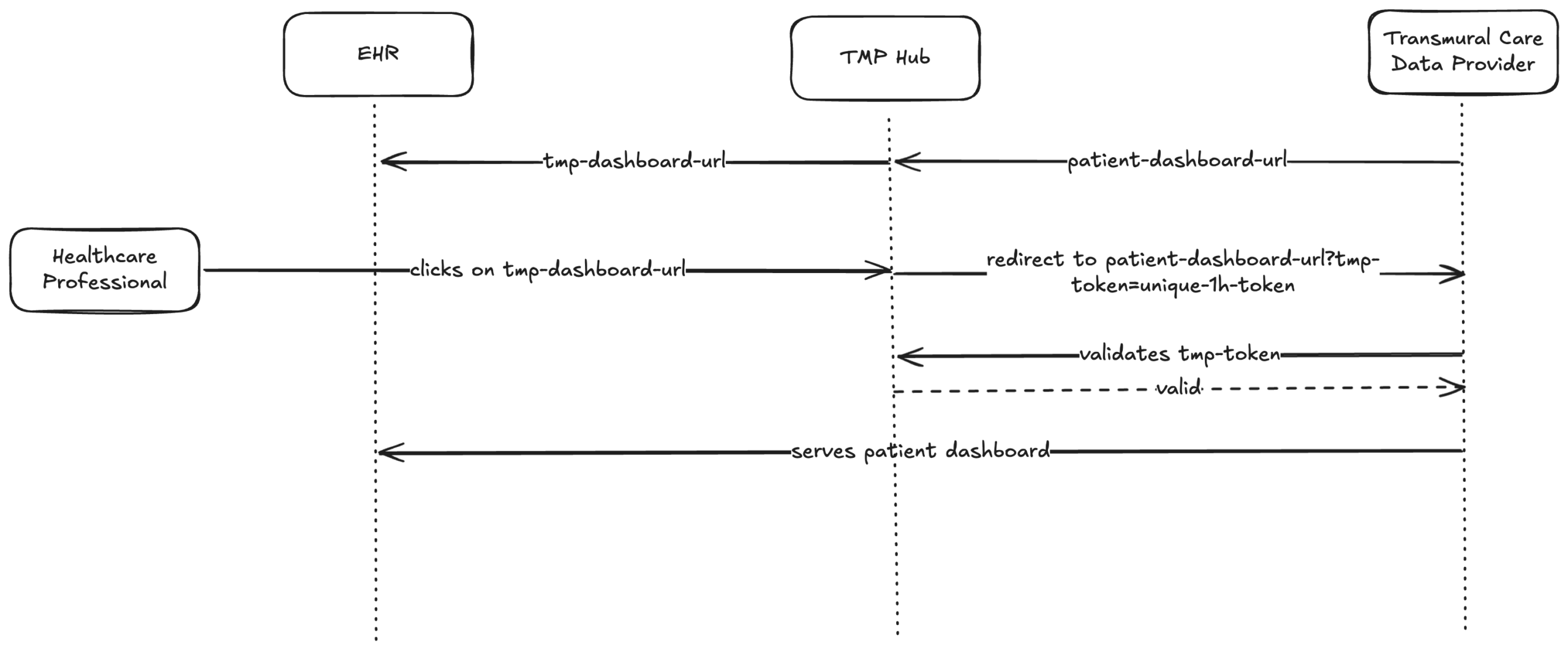
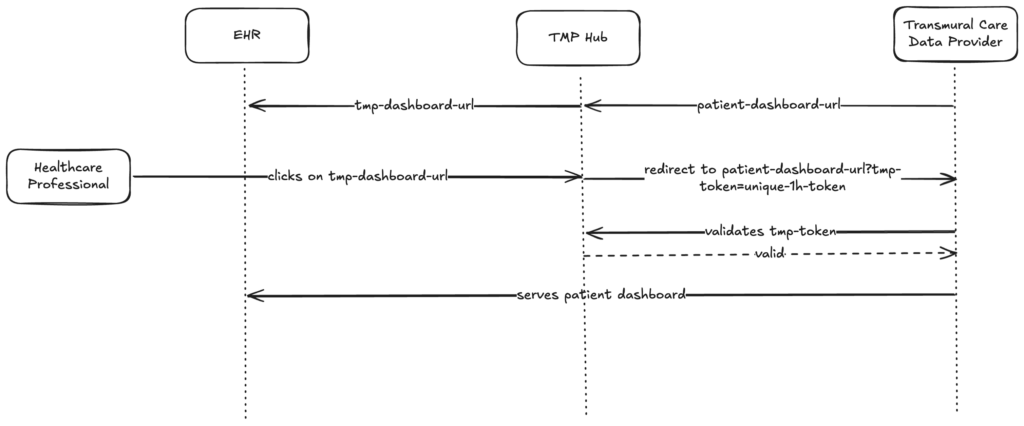
When the Transmural Platform receives the dashboard URL from the data provider, it no longer passes it directly to the EHR. Instead, we replace it with a link that points to the Transmural Platform. The original dashboard URL is never exposed to the EHR or the end user.
Redirect with a temporary token
When the HCP clicks the link, the Transmural Platform will redirect the request to the original dashboard URL of the provider and adds a signed JWT token that expires after one hour to it as a `tmp-token` query parameter.
The token is generated at the moment of access, not at the moment of link creation. This means the one-hour window starts when the HCP actually clicks the link.
Provider-side verification
The data provider receives the request with the `tmp-token` query parameter. Before serving the dashboard, the provider calls the Transmural Platform’s verify endpoint to confirm the token is valid and has not expired. If the verification succeeds, the dashboard is served. Otherwise, access is denied.
What this protects against
– Stale links: Dashboard URLs embedded in the EHR are encrypted and meaningless on their own. Even if stored or forwarded, they only produce a token valid for one hour from the moment of access.
– URL sharing: A shared or intercepted dashboard URL with its token expires within the hour. The provider can also choose to accept each token only once.
– Tampering: The JWT is signed with a secret held exclusively by the Transmural Platform. Any modification invalidates the signature.
– Direct access: Without a valid `tmp-token`, the data provider can reject the request entirely, ensuring every dashboard visit is traceable to an authenticated platform session.
Integration for data providers
Adopting this security layer requires minimal changes on the provider side:
1. Continue returning dashboard URLs as before.
2. When a request arrives with a `tmp-token` query parameter, call the verify endpoint with the token value before serving the dashboard.
3. If the token is valid, serve the dashboard. Otherwise, deny access.
Full technical details, including request and response schemas, are available in our API documentation.
Example flow
- The Provider provides a patient-dashboard
A provider can attach PDFs, FHIR documents or links to dashboards with an update. A patient-dashboard URL might look like this https://provider.com/dashboard?patient=42 - TMP transforms the URL towards the EHR system of the hospital
TMP will replace the dashboard URL with a unique URL containing an encrypted reference to the original URL for example: https://api.telemonitoring-platform.com/provider-patient-dashboard?ref=eFh2Qk… - The HCP clicks on the dashboard URL within the EHR system
TMP will decrypt the reference and redirects the HCP towards the original patient-dashboard url but will add a unique tmp-token which is only valid for 1 hour for example: https://provider.com+dashboard?patient=42&tmp-token=EfLFm… - The Provider receives the request and verifies the token
Before showing the dashboard, the provider does an authenticated call towards TMP to verify if the token received is valid. - The provider serves the dashboard
The HCP sees the patient dashboard. If anyone tries to reuse the same link after the token has expired, the verify call will return false and access to the dashboard is denied.
Closing thoughts
Security in healthcare integrations is not a single gate but a series of checkpoints. By combining encrypted references with short-lived, verifiable tokens, we ensure that patient dashboard access is both time-limited and cryptographically traceable to the Transmural Platform, without imposing significant integration overhead on data providers.
Leave a Reply